Every writer has words and expressions that define their work. They might be technical terms, product names, brand phrases, or preferred expressions you use regularly. InstaText’s Personal dictionary helps you keep those words exactly as you want them – so you never need to correct the same thing twice.
It works across the web Editor and the browser extension, meaning your saved terms will stay consistent across all your writing – from documents and reports to emails and social media platforms.
By storing your personal or professional vocabulary, InstaText saves you time, prevents repetitive edits, and helps you maintain a professional and authentic tone.
It’s another way InstaText keeps you in control not just of every suggestion, but of the language that defines your work.

What Personal dictionary does
The Personal dictionary lets you add individual words and word combinations you want InstaText to leave unchanged.
There are two ways to protect your terms:
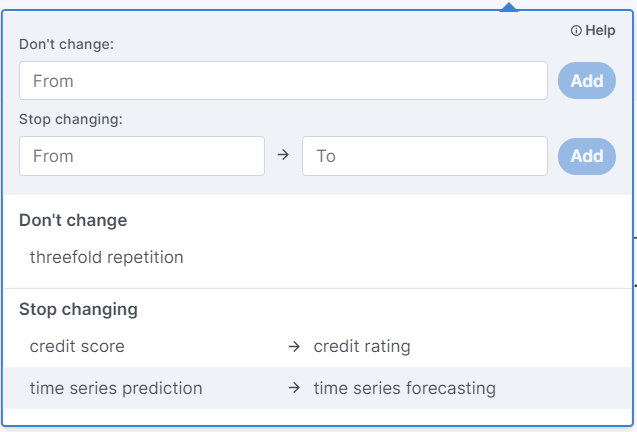
Don’t change: It tells InstaText to always keep a word or phrase exactly as you entered it.
Example: Don’t change “threefold repetition.”
Stop changing: It blocks a specific replacement.
Example: Stop changing “credit score” → “credit rating.”
These options help you control your vocabulary while still benefiting from InstaText’s improvements in spelling, grammar, readability, clarity, and flow.
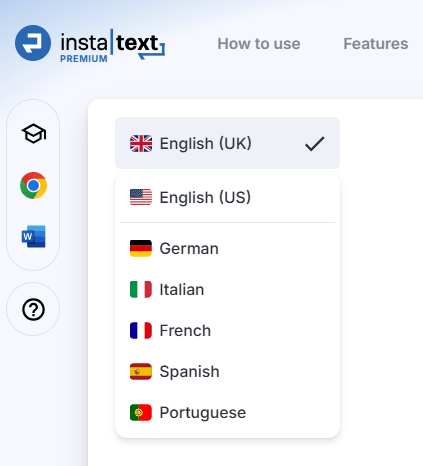
And since InstaText supports multiple languages, you can write consistently not only in English but also in other major languages such as Spanish, French, German, Italian, and Portuguese.
How to use Personal dictionary
1- Open the dictionary
- In the web Editor, choose Personal dictionary from the right-side menu.
2- Add a new entry
- In the Don’t change field, type the term you never want altered and click Add.
- In the Stop changing section, enter the term you want to protect in the From field and the unwanted replacement in the To field, then click Add.
3- Continue writing
- Once added, your entries apply immediately to all future edits – both in the Editor and browser extension.
Example
Suppose InstaText suggests changing “credit score” to “credit rating” in your text:
The company has a good credit rating credit score as its equity ratio is high.
You can fix this permanently by adding a Stop changing rule:
From → credit score
To → credit rating
After this, InstaText will respect your preference:
The company has a good credit score because its equity ratio is high.
Important notes
Exact match required: Entries are case sensitive. If you use variations (e.g. Credit Score, credit scores), add each one separately.
Plural forms are not automatic: Add both singular and plural if you use both.
Precise matching matters: In “Stop changing,” both terms (from and to) must match exactly. Otherwise, InstaText may still suggest a replacement.
Context-dependent changes: If a suggestion involves other edits, InstaText may still display a related recommendation, but your protected terms remain unchanged.
Example:
The company has a high credit rating
good redit scoreas its equity ratio is high.
This may still appear if other grammar changes are involved, but your main protected term will stay intact.
Why use the Personal dictionary
The Personal dictionary offers several key benefits that make writing more efficient and authentic. It saves time by eliminating the need to repeatedly fix the same words or phrases and ensures accuracy by protecting technical terms, product names, and proper nouns.
It also improves consistency, keeping your language uniform across documents, emails, and even different languages. Most importantly, it preserves your personal style, allowing you to maintain your unique voice while InstaText refines clarity and fluency.
Try InstaText Personal dictionary
If you haven’t tried the Personal dictionary yet, give it a go and see how much smoother your writing process becomes. Add your terms once, and InstaText will respect them every time – across the Editor and browser extension.
What our users say
“I am a translator and proofreader by profession and have tried many editing tools. It’s not an exaggeration to say that all the other apps I’ve used so far don’t come close to InstaText. It is literally innovative and revolutionary and has taken the editing game to a new level, leaving other competitors in the dust.”
— Dr. Ghodrat Hassani, Researcher in Translation Studies
“I work in marketing, where I also do a lot of content creation, so InstaText and I have become good friends. It helps me polish my English texts every day at work. Not only is it a proofreading tool, but it also makes the text sound better. The AI behind it works great. I used to use Grammarly, but Instatext does a better job for me.”
— Barbara Viskovic, Marketing And Public Relations Specialist
“It has been incredibly liberating to not agonize over every last word, secure in the knowledge that the AI has my back and will smooth out the occasional rough edge. That freedom alone boosted my daily word counts by more than 10%, which is gold dust!”
— Matthew Siege, Writer